
Tracker Overview
Here is a bit of an overview of our Tracker Point-of-Sale software. Point-of-sale is a rather generic term to use for Tracke but in a broad term, that’s what it is, but geared towards parts sales and service work-orders rather than selling candy or shoes.

You might be wondering why we stayed with a text based system versus the visual flash of a graphical one. Efficiency. If you want to trade flash for ease of use and performance, Tracker is not for you. If however you want an efficient tool for your business... continue by clicking on the arrows to view the complete Tracker overview.
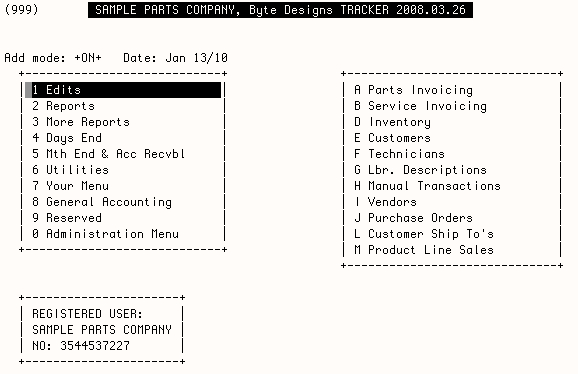
Tracker’s main menu. Task selections can be made by using arrow keys or by simply pressing the number or letter associated with the task.
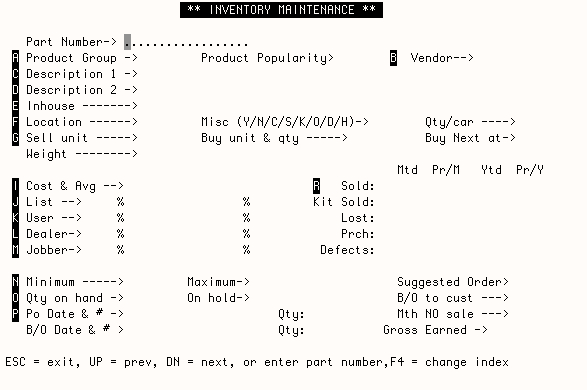
The main inventory record.
Use the telnet terminal program that should already be on your computer to connect to our Tracker Demonstration Server.
Are you on Windows? Use a Telnet session to connect to the Tracker Server.
- Enter telnet://208.181.117.9 in your browser’s address bar, or...
- Open a dosbox/command window via Start Menu --> Programs --> Accessories --> Command Prompt and enter telnet 208.181.117.9

Are you a Mac/OS X user? Try Tracker here using the Mac’s Terminal program: telnet://208.181.117.9
Login and password is tracker for both Mac and Windows connections..
Questions? Problems? Email us.
Once connected,
use the ? at prompts for localized help and/or view the tracker documentation at Tracker User Guide