 The icon may be
on your desktop or installed on your Start-->Programs menu. Please consult your Systems Administrator.
Tracker Print Spooler
Overview
The Tracker Print Spooler is used to allow Tracker to print across networks and Print Spooler is also used for "Forms-on-the-Fly" printing.
The Tracker Print Spooler uses the printer set as your default printer as its
own default destination.
Print Spooler monitors the folder(s) configured as spool folders and will print
submitted files. Print Spooler can print plain text files or XML files.
XML files are used with "Forms-on-the-Fly" printing and require a template
created with MS Word.
MS Word must be installed on the computer if "Forms-on-the-Fly" is used.
Tracker Print Spooler may be installed to start as a Windows Service in which case no manual startup is required.
If manual startup is used in your particular environment click on the Tracker
Print Spooler icon.
The icon may be
on your desktop or installed on your Start-->Programs menu. Please consult your
Systems Administrator.
If an attempt is made to start the Tracker Print Spooler
while it's already running a message will be displayed and the start will
be cancelled.
Tracker Print Spooler starts in a stopped condition. Any jobs
submitted before Tracker Print Spooler has been started will be printed once
started.
No jobs will be lost.
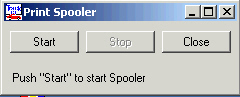
Push the Start button and Tracker Print Spooler will be active.
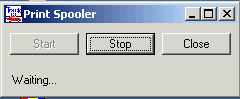
As a print file is being processed the name will be displayed in the message area of the dialog.
Tracker Print Spooler can be minimized to your taskbar without interrupting the printing.
Copyright © 2005 Byte Designs Ltd. All Rights Reserved.