Retrieving/Using Part Numbers from the Inventory Price File

Previously deleted part numbers can only be retrieved from the Price File if they were transfered to the Price File at the time the number was deleted from the Master Inventory.
The Inventory Price File contains just basic information about a part number. Information included is description, cost and selling prices. When importing/updating Inventory from a file supplied by a supplier your may only carry a small percentage of the part numbers the supplier has available. The price file allows you to retain pricing information and should the number be used in a sale, minimum information is readily available, information that is easily used when creating a master inventory record for the item without manually keying the information.

When a master inventory part number is deleted you are given the option to transfer information to the price file as the number is deleted.

How is a part number retrieved?

When a part number is entered at the part number prompt the system checks to see if it exists, if there is a supersede or if an alternate has been assigned. If by now it has not found the number that has been entered it will take it as a new addition.

In the process the Inventory price File is checked to see if the number exists there and if it does the information available is displayed.
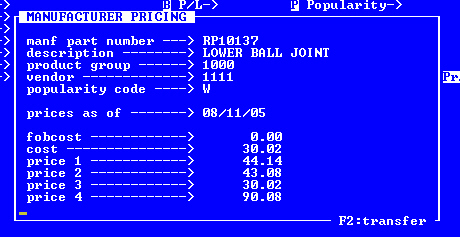
If you want to use the information displayed press F2, otherwise press ENTER to start a new record.

A confirm YES/OK will be required. Enter NO to abort the transfer of information to inventory.