To delete a Part Number press the asterisk (*) key while at the Edit Prompt. (Hold the SHIFT key while pressing the number 8/* key)
The system will check to assure that bin quantity is zero. If not an error message will be displayed at the lower left of the inventory window.

On Order and On Back-Order quantities are also checked and if not zero an appropriate error message will be displayed in the lower left of the inventory window.
Once the system confirms that it can allow a delete you will be asked to confirm.
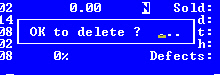
You can reply YES or OK. Enter NO if you don't want to delete the record.
If you've confirmed the delete is to take place you will be given the option to retain some of the parts' information in the Inventory Price File for possible later use.

Reply YES or OK if you want to keep information about the part in the price file, NO if you don't.
See Retrieving Part Numbers from the Price File to put a number back into use as a master inventory number.